Hikvision error code 800 shows up on the iVMS-4200 when you try to access the live view or playback your security cameras. The full error message shows as Playback failed. Error code: HCNetSDK.dll[800].
Error code 800 is related to an insufficient bandwidth which means the iVMS-4200 software cannot handle the bandwidth coming from the all cameras. Maybe you’re trying to pull the feed from too many cameras at the same time or maybe your local network is overwhelmed. Additionally, there may be many clients (users) who are watching the cameras at the same time.
How to fix Hikvision error code 800
1.
Lower the bitrate and frame rate of your cameras. You can do this directly via the NVR or DVR system or by accessing the settings via the web browser. Below we’ve shown the settings via the web interface.
Type the IP address of your recorder or camera, go to Configuration and then Video&Audio. Here you can adjust the max. Bitrate and the frame rate. Lower them a little bit and then see if the error code 800 goes away.
 2.
2.
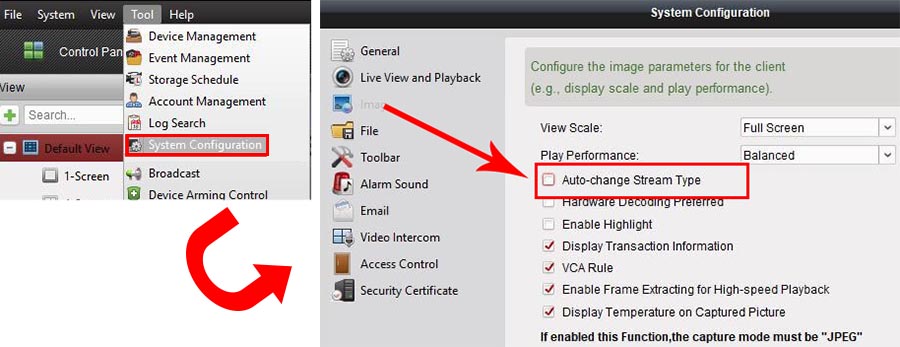
The Hikvision IP camera or recorder (DVR/NVR) has two video streams: mainstream and sub-stream. These two types of streams depend on the resolution, frame rate, and compression type (H.264, H.264+ or H.265), when the camera auto changes the stream it can cause error 800.
To fix the 800 error code, open up the iVMS-4200 software, go to Tool and then System Configuration. Access the Image section and untick Auto-change Stream Type (check the picture below).
3.
Make sure your NVR/DVR and the iVMS-4200 are updated to the latest firmware. Additionally, it has been reported that sometimes the issue gets fixed if you reboot the software, computer and the recorder itself.
4.
Ultimately the issue on Hikvision error code list is marked as “No more bandwidth can be used”, meaning your local network may not be designed correctly such as the switches are not able to handle all the traffic coming from the cameras or the router is too overwhelmed to process all the information. Locate the bottleneck on your network and correct the issue.
5.
Make sure each user is using a separate account meaning not two people trying to see the cameras using the same username and password. Create specific accounts for each person who will have access to the security system.
