3.12.22

CHECK THE HOSTNAME OF A DESKTOP USING IP ADDRESS


Click the Windows Start button, then "All Programs" and "Accessories." 

Right-click on "Command Prompt" and choose "Run as Administrator."  

Type "nslookup %ipaddress%" in the black box that appears on the screen, substituting %ipaddress% with the IP address for which you want to find the host name.


---------------------------------------------------------------------

8.11.22

How to fix Windows 11 Black and White Screen issue


Solution of Windows 11 Black and White Screen issue

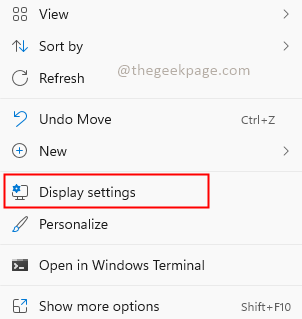
Step 1: Right-click on desktop and select Display settings.


Display Settings Min


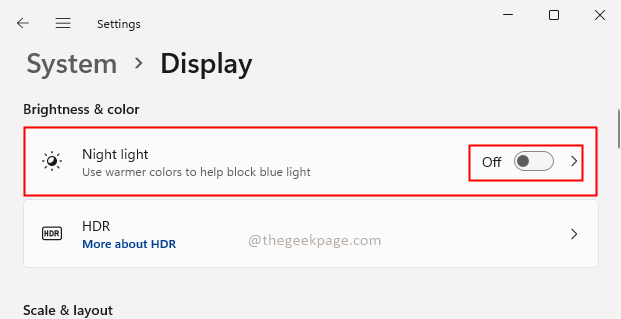
Step 2: In the Display settings, check if the Night light feature is turned off. If it is not turned off, click on the toggle button to turn it Off.


Night Light Min


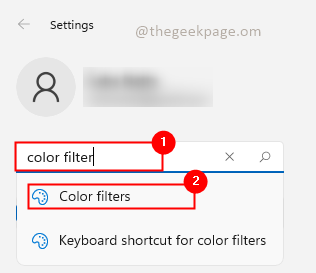
Step 3: Search for Color filters in the search bar of settings.


Color Filetrs Min


Step 4: Check whether the Color filters option is turned On. If Yes then disable it to turn off the Greyscale filter or other color filters which is selected. If No then turn it On and Off. If there is any glitch in the system turning it On and Off will override the settings.


14.9.22

Windows - Stop shutdown every hour

First download Windows PsTools.

This tool is provided by Microsoft for maintaining processes and services through command line.

We will extract all the contents of the zip file in C:\ drive into the folder PS (which we just created)

Open CMD in 'Run as Administrator'

c:> CD PS

c:> psexec -i -d -s cmd

Click- Agree on the license agreement dialog box
Then you will get another command prompt running under "nt authoriy\system"
To check if the command prompt is running under "nt authority\system"
 
c:> whoami
 
Then type,
c:> services.msc
 
Then services window will open.  

Select Windows licensing Monitoring and change the startup type to DISABLE.

After that restart the machine..